How to Prompt a Consistent AI Influencer
8 min read
Anyone can generate one good AI portrait. Nobody pays to follow one photo. The money lives in a persona that looks like the same real person across a hundred posts, a face people recognise on sight and never once doubt.
Two things break that illusion. The face drifts, and the images look fake. Fix both and you have something people believe, follow, and pay for. Miss either and you have a folder of pretty strangers. This is the guide to fixing both.
One photo is a gimmick. A persona is a business.
A follower needs to know her instantly. Same face, same energy, every time she appears in the feed. One off-model image and the spell cracks. The nose is wrong, the jaw shifted, and your audience feels something is off even if they cannot name it. Trust drops, and so does revenue.
So treat consistency as a product requirement, not a nice extra. It is the difference between a character and a costume.
The devil is in the detail
Here is the part almost nobody tells you. Locking the face is only half the job. The image also has to read as real, and realism is bought with detail. A lazy typed prompt gives you plastic skin, dead eyes, and that instant AI smell everyone has learned to spot. A detailed prompt gives you pores, real light, a slightly imperfect frame, and a photo that quietly passes.
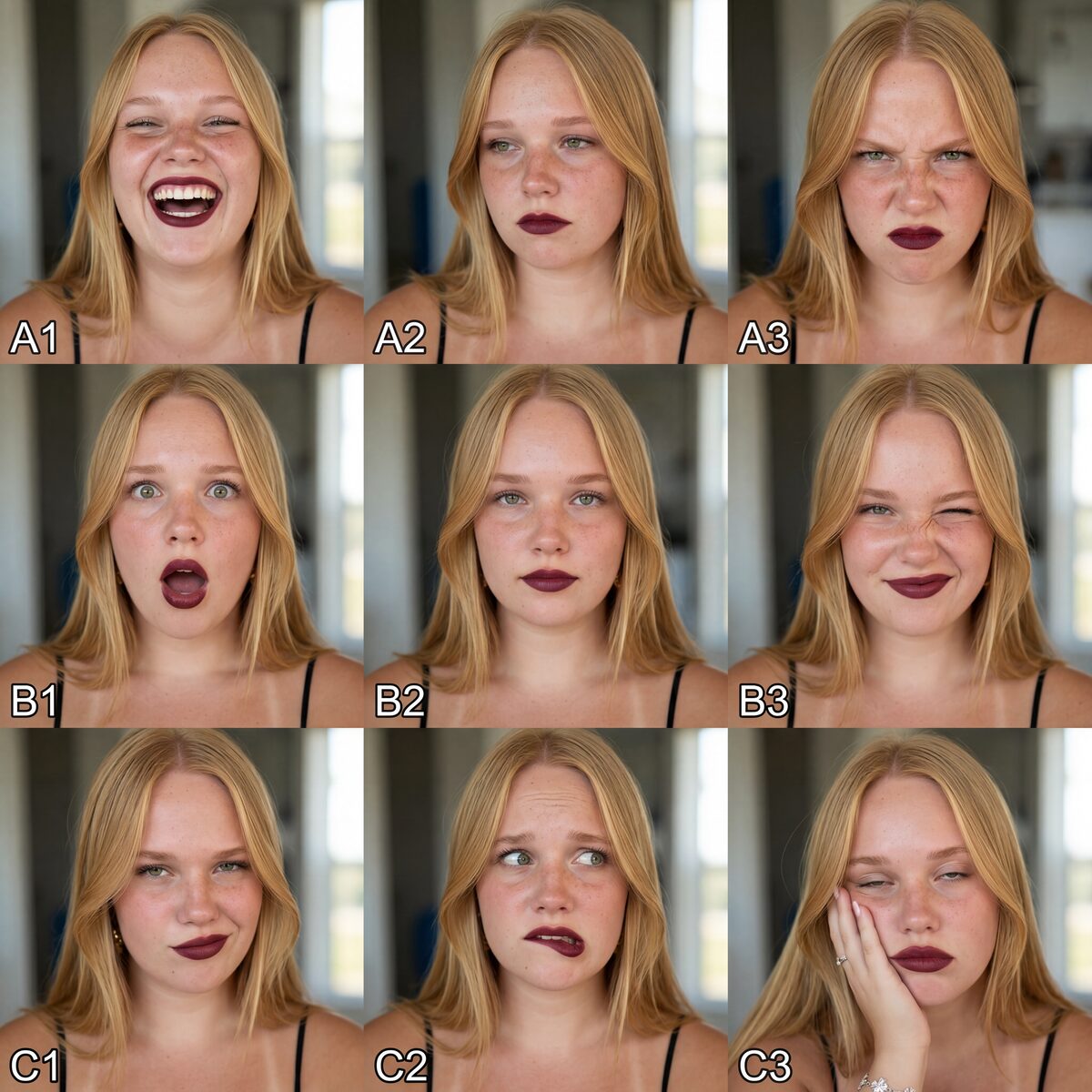
Same reference, same model, same woman. The only thing that changed is the words. Start with the reference below, a character sheet that shows one face across many expressions and angles.

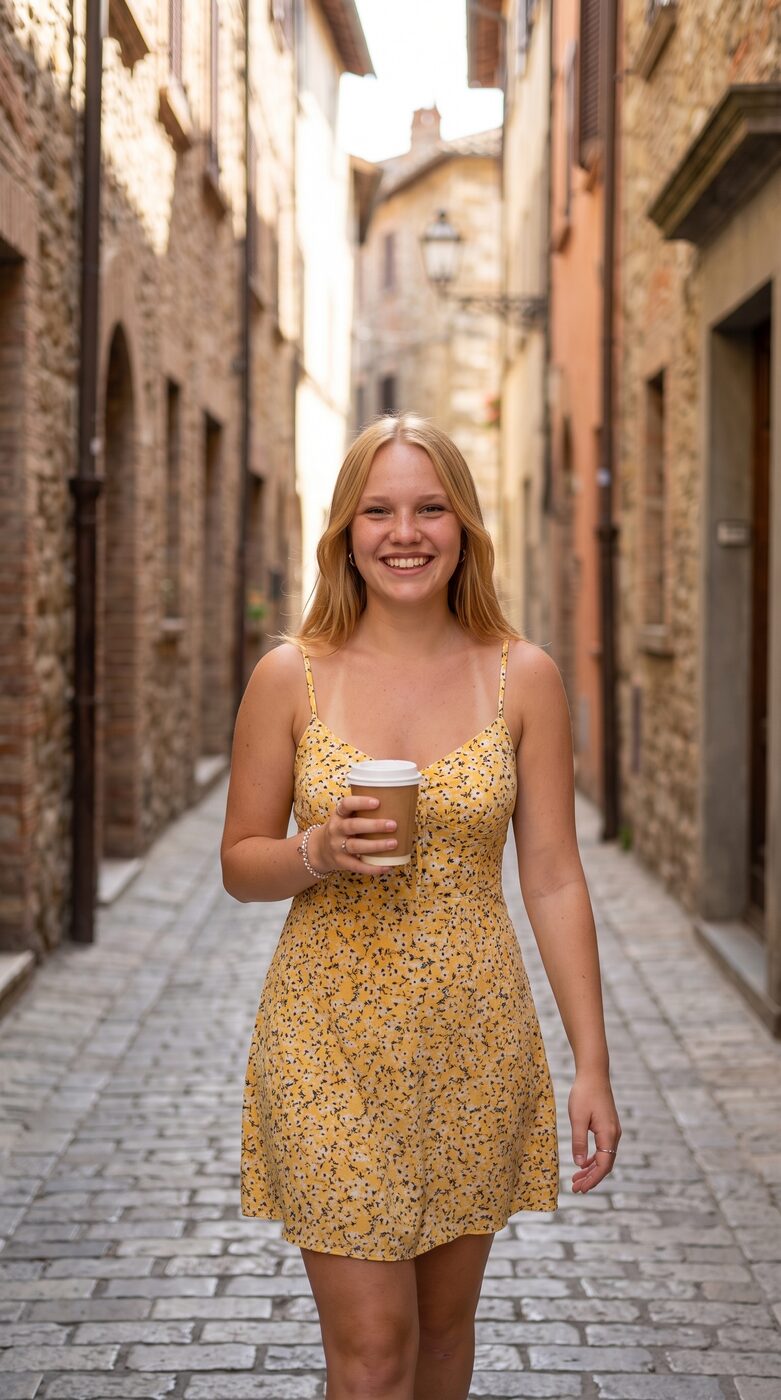
Left is a full PROmpt prompt. Right is "a realistic photo of this woman wearing a yellow sundress smiling holding a coffee in a narrow alley". Same reference, same model. The detailed prompt gives real skin, real light, and a candid moment. The lazy prompt gives you the AI look. That gap is the whole game.
Prompting is all you need (almost)
The reference decides who she is. The prompt decides how real she looks. You have the reference handled with a character sheet, so realism now comes down to how much detail you feed the prompt. Below is the exact skeleton behind every pack in the library. Freeze the identity clause, and only ever change the scene.
[Framing and shot type. For example a mid-to-full body candid Instagram photo at eye level, slightly off-center, with a gentle handheld tilt, at close-friend distance] of one adult woman.

Preserve the character identity from the reference image, keeping their exact hair color, hairstyle, eye color, skin tone, face shape, and body shape.

[Scene. Where she is, the time of day, the background, the weather.]

She wears [wardrobe. Specific garments, colors, fabrics, and accessories].

[Action. What she does with her hands, head, and gaze, caught mid-moment.]

[Light. The direction, the quality, the color temperature, the shadows.]

no readable text, no signs, no logos, no captions, no watermarks. Natural skin texture, realistic hands and fingers, believable fabric folds, accurate shadows, undistorted architecture, no waxy skin, no extra fingers.

[Camera. Pick one of the two anchors below.]
shot on iPhone 15 Pro Max main 1x camera, 24mm equivalent wide lens, ƒ/1.78 aperture, realistic smartphone photography, natural iPhone HDR
Shot on iPhone 15 Pro Max main 0.5 ultrawide camera, ultrawide lens, realistic smartphone photography, natural iPhone HDR
That last block, the camera line, is the single biggest realism lever in the whole prompt. Naming a real phone and a real lens tells the model to render like a smartphone sensor instead of a glossy studio render. Keep one of these two anchors on every shot in a set so the whole feed feels shot on one device.
- Main 1x, 24mm, ƒ/1.78. Your default for portraits and mid-to-full body shots with a natural, close feel.
- Ultrawide 0.5x. For wide environmental shots where you want the whole scene around her, a room, a street, a beach.
Your reference makes her or breaks her
Everything starts with the reference. Get it wrong and nothing downstream saves you. The single biggest mistake, by a wide margin, is a weak reference. Low resolution, strange lighting, an awkward angle, and the model has nothing solid to lock onto, so it guesses, and it guesses differently every time.
- Use a character sheet, several clean shots of one face across angles and expressions, like the grid above.
- Keep it high resolution and evenly lit, with no harsh shadows or extreme angles.
- Give the model the whole head, front, side, and three quarter, so it learns a person rather than one flat selfie.
A dedicated guide on building that starting image and character sheet from scratch is coming next. For now, one clean multi-angle sheet is enough to begin.
Freeze the identity, change the scene
Structure every prompt in two parts. An identity block that never changes, and a scene block that carries everything else. The identity block is the reference clause above. The scene block holds the location, outfit, pose, light, and camera. When the identity words stay identical across a whole set, the model stops reinventing her and starts repeating her.
One model cannot do it all
No single model does everything well. Reach for Nano Banana 2 for identity-locked edits from a reference at high resolution, and GPT Image 2 when peak realism is the priority and you can prompt carefully. A character LoRA is the next rung once your posting volume makes referencing every shot too slow, and ComfyUI or Flux are for builders who want full control. The full head to head is in Nano Banana 2 vs GPT Image 2 for AI Personas.
Five ways creators wreck a good persona
- Leaning on adjectives instead of a reference. Words drift, references hold.
- Changing identity, scene, and camera all at once. Vary one thing at a time so you can see what moved.
- Feeding a single flat selfie instead of a multi-angle character sheet.
- Chasing one perfect image instead of a consistent set. The set is the asset, not the hero shot.
- A different camera feel in every post. Lock one iPhone anchor so the whole feed looks shot on the same phone.
Do not take my word for it, see it
Every pack in the PROmpt library is built on this exact structure, a frozen identity clause, a varied scene block, and a locked iPhone camera anchor, tested on a live reference before it ships. Here is what makes them different from the free prompt dumps you have seen.
- Every prompt is shown beside the real image it produced, so the result is proven, not promised.
- Every pack is tuned for realism first, so you skip the plastic-skin phase entirely.
- Everything is free to copy. No signup, no credits, no upsell.
Bring your own reference, pick a pack, and copy the prompt. Start with the mirror-selfie realism of the Tight Outfit Mirror pack, or the bright outdoor sets in Endless Summer.
Want to go deeper and swap notes with other creators building the same way? Come say hello in the PROmpt community on Discord.
Questions creators ask
What makes the best reference image for a consistent AI influencer?
A character sheet with several high resolution shots of the same face from the front, side, and three quarter angles, all evenly lit. Avoid low resolution, harsh shadows, and extreme angles, since those give the model nothing stable to lock onto.
Why do my AI influencer photos look fake even when the face stays consistent?
Consistency and realism are two separate problems. A short prompt can hold the face and still render plastic skin and flat light. Detail is what buys realism, especially a real camera and lens anchor, which is why a detailed prompt beats a typed one on the same model.
Should I use Nano Banana 2 or GPT Image 2 for a recurring persona?
Use Nano Banana 2 for identity-locked edits from a reference at high resolution. Reach for GPT Image 2 when peak realism is the priority and you can prompt carefully. Plenty of creators use both, one for locking identity and one for hero shots.
Do I need to train a LoRA to keep a persona consistent?
Not to start. A strong reference plus an edit model carries you a long way. Train a LoRA once your posting volume makes feeding a reference every time too slow.
How many images should my reference character sheet have?
Three to six clean angles is plenty. Quality and even lighting matter far more than raw count, so a handful of sharp shots beats twenty messy ones.
Can I keep the same face across video too?
The same identity-first approach applies, though video adds motion consistency on top. Lock the face in stills first, then carry that same reference into your video tool.